✨ Theme baru saja dirilis! View now
EN

SaeMart – WooCommerce Marketplace WordPress Theme

⚡ Flash SaleEnds in 20h : 51m : 15s

From Rp150,000 Rp275,000 Save Rp125,000

Product nameSaeMart

Version1.0

Release date26 Agustus 2026

Last update26 Agustus 2026

Choose edition
Choose license ⓘ

🚀 Choose a higher plan for more sites and better overall value.

From Rp150,000Rp275,000

Live Preview ↗ View Documentation →
  • ✓ One-time payment
  • ✓ Lifetime free updates
  • ✓ Premium support

SaeMart WooCommerce Marketplace WordPress Theme

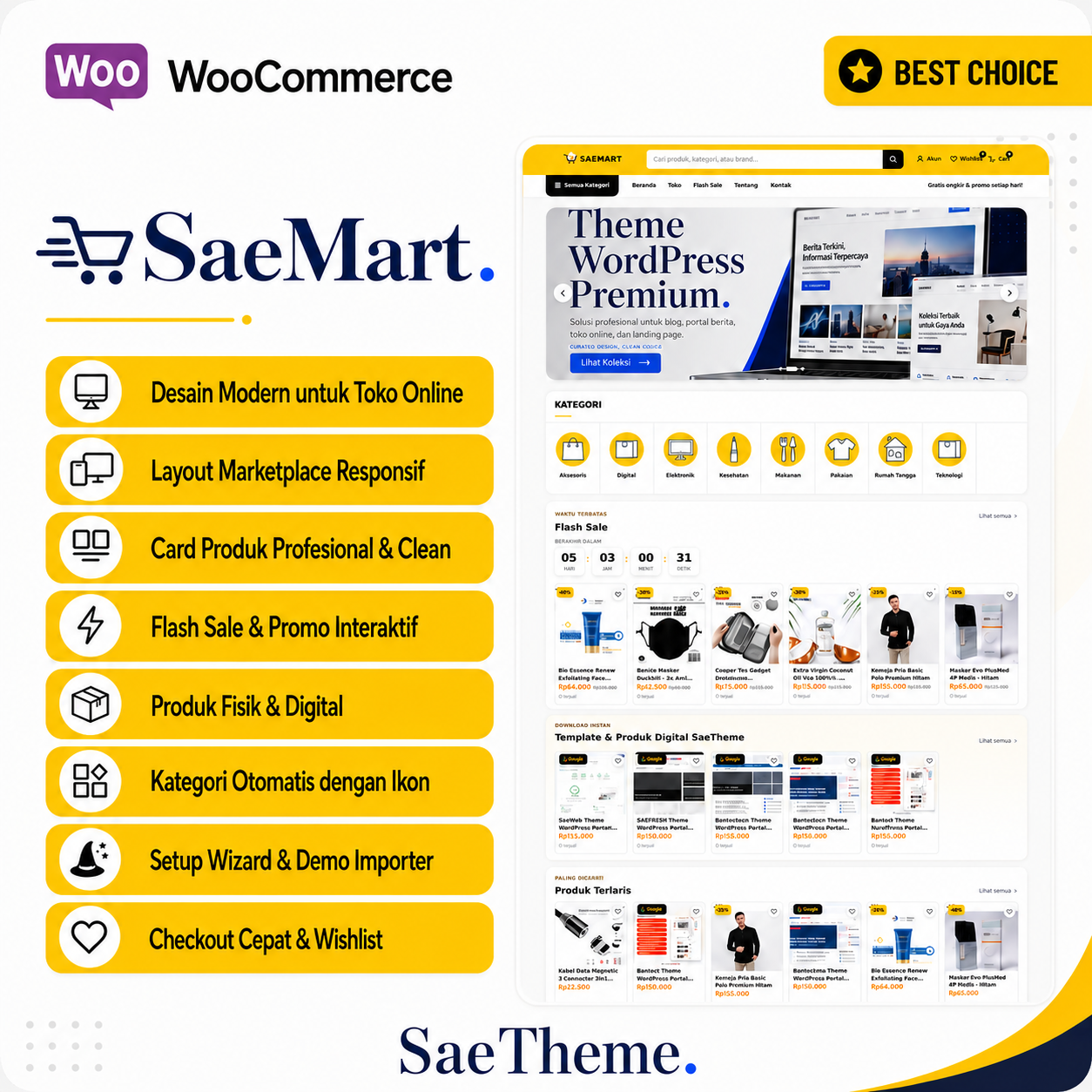
SaeMart is a native WordPress and WooCommerce ecommerce theme for online stores, marketplace-style catalogs, physical products, and digital downloads. It does not depend on a static HTML snapshot or hard-coded WooCommerce product IDs.

Marketplace storefront built around WooCommerce

The homepage includes a promotional slider, product-category carousel, Flash Sale, digital products, best sellers, promotional cards, latest products, recommendations, and brand collections. Store content is queried directly from WooCommerce.

Desktop and mobile shopping experience

The responsive header includes product search, account, wishlist, cart, category navigation, mobile search, and a mobile drawer. Product pages include discount percentage, ratings, sales count, stock status, wishlist, WhatsApp chat, Add to Cart, Buy Now, external marketplace links, and mobile sticky actions.

Professional setup wizard

A six-step setup wizard handles system checks, WooCommerce installation, Demo Importer upload, demo selection, store information, and completion. Demo content remains separate from the core theme for cleaner updates.

Detailed documentation

The bundled SaeTheme documentation covers installation, WooCommerce, the setup wizard, homepage sections, Customizer settings, product pages, digital products, marketplace links, payment and shipping footer rails, demo import, performance, updates, and troubleshooting.

Theme Features

  • ✓ Native WordPress + WooCommerce marketplace theme Responsive desktop, tablet, and mobile layouts Professional six-step setup wizard WooCommerce installation assistance Demo Importer separated from the core theme Three-slide homepage advertising and promotion slider WooCommerce product-category carousel with bundled icons Automatic Flash Sale section from WooCommerce sale products SaeTheme Templates & Digital Products section Best sellers based on WooCommerce total sales Latest Products and Recommended for You sections Brand & Collection section from product tags Responsive 6 / 3 / 2 product grid Discount percentage and digital-product badges Rating, sold count, and stock status on product pages Wishlist experience WhatsApp chat, Add to Cart, and Buy Now actions Mobile sticky product actions External marketplace links for Shopee, Tokopedia, TikTok Shop, Lazada, Blibli, and Bukalapak WooCommerce gallery zoom, lightbox, and slider support Desktop and mobile product search Native WordPress menus and submenus Animated payment and shipping partner rails in the footer Bundled payment and courier logos Customizer controls for branding, WhatsApp, hero, slider, homepage sections, and footer Physical and digital products supported Detailed English and Indonesian documentation

Changelog

v1.0 — Official SaeTheme Release - Introduces SaeMart as an official SaeTheme v1.0 product - Based on the mature internal WooCommerce marketplace build previously identified as 1.0.15.9 - Normalizes the public release version to v1.0 without changing theme layout or functionality - Six-step setup wizard - WooCommerce integration for shop, cart, checkout, account, physical and digital products - Promotion slider, categories, Flash Sale, best sellers, latest products, recommendations, and brand sections - Wishlist, WhatsApp chat, Buy Now, marketplace links, and mobile sticky actions - Professional payment and shipping footer rails - Demo Importer remains a separate plugin - Adds SaeMart to the SaeTheme catalog with the saemart license slug - Adds detailed English and Indonesian documentation

Complete usage guide

Learn installation, license activation, menus, homepage setup, Customizer controls, advertising, optimization, updates, and troubleshooting.

Open Product Documentation →